Customer data obfuscation
Learn more about how to protect your customer's production data in the Knock dashboard.
Enable customer data obfuscation at the environment level, or through custom permission groups on Enterprise plans, to determine what data your team members can see in the Knock dashboard.
Overview
#When you choose Knock to power your notifications, you're also choosing to trust us with your customer data and the data you pass in your notifications. This is why security is a foundational priority for us at Knock, and it's also why we built our customer data obfuscation controls.
With customer data obfuscation controls, the Knock dashboard automatically hides any data that might contain either user PII or customer proprietary data. This means that the only data your team members will see in the Knock dashboard is anonymous data such as UUIDs. Customer data obfuscation is managed via our backend, so users won't be able to get at this data through their browser consoles.
You can enable customer data obfuscation in two ways:
- Environment-level. Hide customer data for every team member in a given environment. Use this to obfuscate production data while keeping development data visible for testing and debugging.
- Permission group. On Enterprise plans, hide customer data for members of a custom permission group, either in every environment or in specific environments.
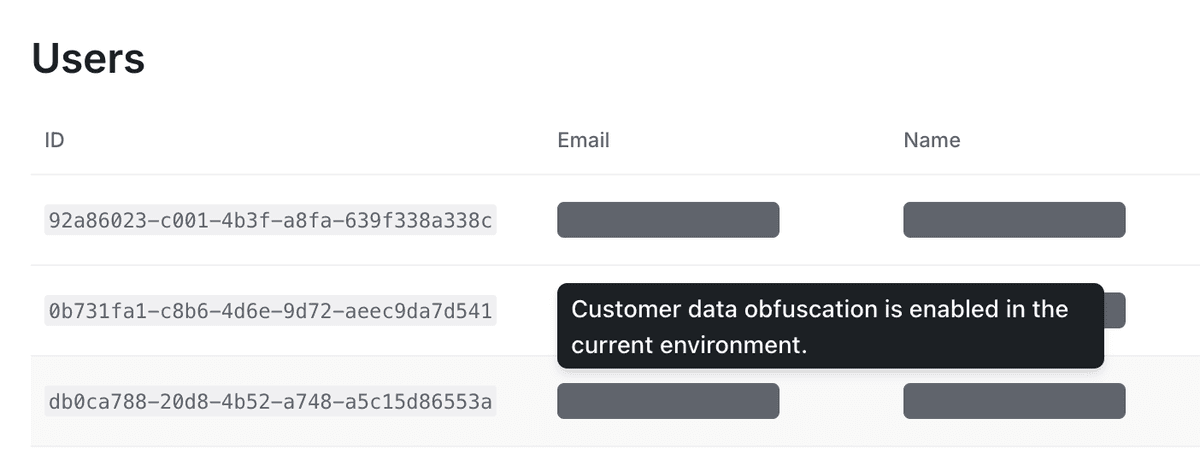
Environment-level obfuscation
#Environment-level obfuscation applies to every member in that environment, including members with built-in roles. Built-in roles have no per-role obfuscation setting.
To enable customer data obfuscation for an environment, go to the Environments page under the Version control section of your account settings in the Knock dashboard. Select the "..." for the environment you'd like to configure and click "Edit environment."
Per-member role obfuscation
#Custom permission groups can enable customer data obfuscation under environment access. When enabled, all message, user, and object data will be obfuscated in the Knock dashboard for members of that group.
Create and manage permission groups under Settings > Permissions. You set the obfuscation rule in the same editor you use for environment capabilities:
- Same access in every environment. Enable obfuscation once to apply it across development, production, and any additional environments.
- Per-environment access. Use granular mode to enable obfuscation in specific environments. For example, hide customer data in production for a support group, and leave it visible in development.
A group's obfuscation rule for a parent environment also applies to that environment's branches.
If a member belongs to more than one custom permission group, Knock hides customer data when any assigned group enables obfuscation for that environment. Learn more in our roles and permissions documentation.
Precedence
#If customer data obfuscation is enabled at the environment level, that setting applies to every member in the environment. A permission group cannot turn environment-level obfuscation off or reveal data the environment already hides.
A permission group can only add obfuscation. When the environment setting is off, the group's rule determines whether members of that group see customer data in that environment.